Apple iOS 26 Beta: Details and User Feedback — August 2025
Apple iOS 26 Beta: Details and User Feedback
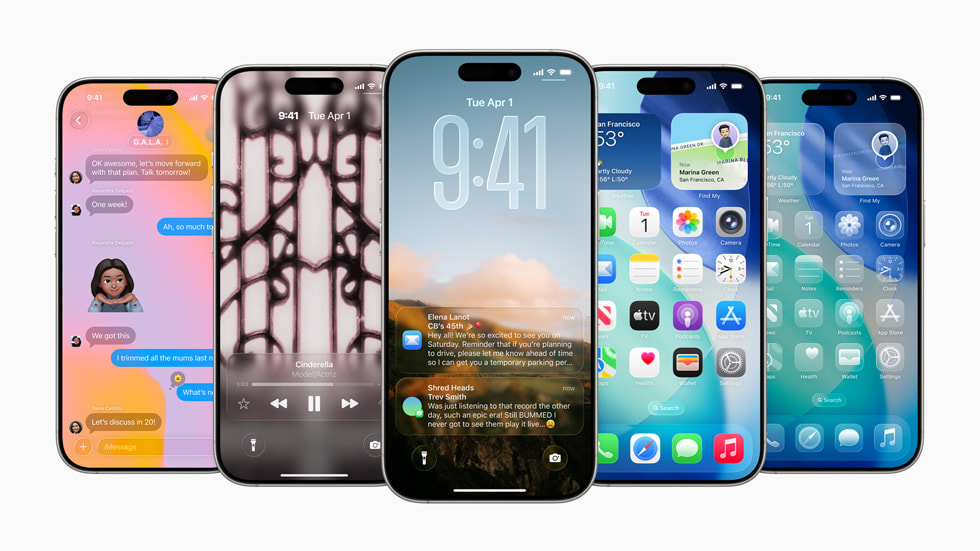
Executive summary
iOS 26 Beta delivers the biggest visual redesign since iOS 7 — the new “Liquid Glass” aesthetic — and a major push into on-device AI (branded Apple Intelligence). The beta series (betas 1 → 6) shows rapid refinement: early releases had stability and battery pain points, while later betas improved fluidity and fixed many regressions. Apple targets a public release around September 2025, likely alongside the iPhone 17.
Key features & UI changes
Liquid Glass Design
Translucent, layered UI with motion/tilt responsiveness. New blur and depth treatments for Lock Screen, Control Center, notifications, and Home Screen elements.
Refined animations
Bouncy, snappy transitions across the system — improved in betas 5–6 to reduce stutter and improve launch feel.
Games app
A centralized Games hub for discovery, leaderboards, and multiplayer invites (Apple Arcade integration).
Messages & Communication
Custom chat backgrounds, polls, improved group features, Call Screening and Hold Assist for phone calls.
Camera & AirPods
AirPods (H2) as a remote shutter; improved audio capture and simplified Camera UI with a Classic Mode toggle.
Smaller but useful tweaks
Multiple journals in Journal app, flexible snooze (1–15 min), Control Center Wi-Fi lock icons, accessibility upgrades and more.
Apple Intelligence (on-device AI)
Apple Intelligence is tightly integrated across iOS 26 — pushing natural-language, visual search and contextual automation to core workflows.
Main AI capabilities
- Live Call Translation — real-time translation for phone/FaceTime calls.
- Visual Intelligence — on-screen visual search (ChatGPT integration for advanced queries).
- Contextual suggestions — reminders and to-dos auto-suggested from emails/messages.
- Genmoji & Image Playground — quick emoji generation and simple in-phone image creation tools.
- Adaptive Power Mode — intelligent, usage-aware battery/performance adjustments.
Performance, battery & compatibility
| Aspect | Observed behavior in betas |
|---|---|
| Stability | Early betas (1–3): frequent crashes and UI glitches. Beta 5–6: much improved stability; many regressions fixed. |
| Battery | Significant drain in early betas. Adaptive Power Mode helps; later betas show meaningful battery improvements but some devices still see higher consumption. |
| Heat | Overheating reported on some iPhone 15 Pro/Pro Max units during heavy tasks in early betas; reduced in later betas. |
| App compatibility | Some third-party (especially older banking apps) crashed in early betas. Compatibility improves as apps update; caution advised for daily drivers. |
What beta testers are saying
Positives
- Liquid Glass + animations make iOS feel modern and fresh.
- AI features (live translation, visual search) described as “game changers” by many testers.
- Later betas (5–6) show significant improvements: snappier app launches, fewer crashes, better battery behavior.
Negatives / pain points
- Early betas caused app instability, overheating and fast battery drain.
- Some users reported readability issues with aggressive translucency (addressed in later betas).
- Not recommended for non-technical users’ main devices until stable release.
Quick tester rubric
Enthusiast / power user: OK to install on secondary device — enjoy features early.
General user: Wait for stable release (September 2025) if you need rock-solid reliability.
Recommendation & final verdict
iOS 26 Beta is exciting: a bold visual refresh plus practical, integrated AI. If you enjoy experimenting and can tolerate occasional bugs, install on a secondary device. If your phone must "just work" for banking, work, or ridesharing, wait for the stable release (expected September 2025).
Pro tip: Back up your device before installing any beta. Keep a fallback plan (e.g., perform a full iCloud/Local backup) in case you need to revert.
Beta timeline & rollout notes
Public beta availability starts with devices from recent generations (iPhone 11+ in initial reports), while the most advanced AI features require iPhone 15 Pro/Pro Max or later. Apple moved to a faster weekly beta cadence as the release neared — expect a Release Candidate in early September and general availability in mid-September alongside new hardware.
Compatibility checklist
- Install only on devices you can wipe if needed.
- Check critical apps (banking, wallet, work apps) for compatibility before switching your main phone.
- Monitor beta release notes; they change quickly from one beta to the next.
Quick reference — Pros & Cons
| Pros | Cons |
|---|---|
| Striking UI; strong AI features; improved later-beta stability | Early battery & compatibility issues; not 100% ready for every primary device |


Comments
Post a Comment